Genshin Cheats — Genshin Impact cheats hero banner on Windows PC

World ESP too cluttered

World ESP is too cluttered — every seelie and shrub lights up and I cannot read chests.

ESP

patch_wait OP
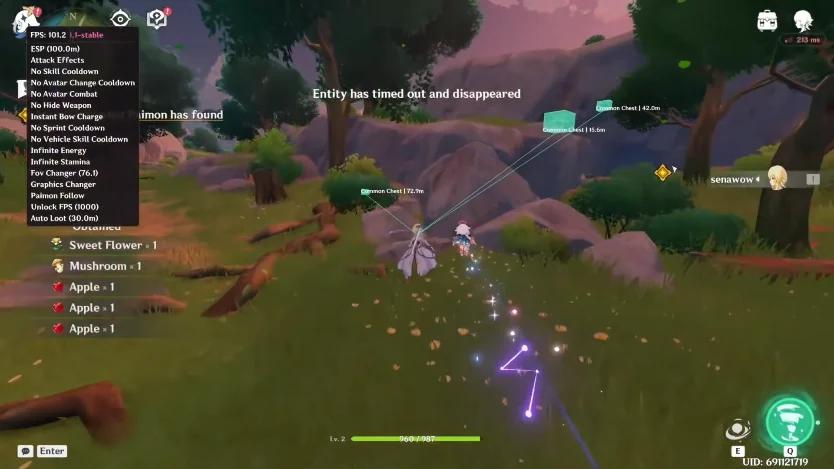
Genshin Cheats world ESP with chest boxes on PC

World ESP is too cluttered in Mondstadt. Chests, oculi, plants, and monsters all draw at once and I lose the chests I actually want.

Is there a filter or distance cap so I can keep boxes for chests and turn the rest down? The Features page mentions category toggles.

8 Replies

  1. hotkey_save

    Turn off plants and seelie first. Keep chests and oculi. Mondstadt becomes readable in about ten seconds.

  2. cloud_dma

    Drop draw distance too. I run a shorter cap in cities and bump it in the wild. Fontaine Harbor is otherwise a mess of labels.

  3. genshin_staff Staff ✓ Solution

    Use the category filters: chests, oculi, resources, monsters, and map points are separate toggles. Add a distance cap so far markers do not fill the screen. Option list is on Features.

  4. patch_wait OP

    Where are the category toggles — under world ESP?

  5. hotkey_save

    Yeah, world ESP section. Uncheck resources and monsters while you hunt chests, then flip monsters back on for elites.

  6. aim_hold

    Opacity slider helps at night in Inazuma. Bright boxes on dark cliffs are hard to read if they are at 100%.

  7. patch_wait OP

    Filters + shorter distance did it. Chests are the only boxes I see now.

  8. cloud_dma

    Save a “chests only” preset if the menu lets you. I swap that for a “farm” preset with plants on.

This thread is closed. Replies were disabled after the discussion wrapped up. For account or license questions, contact Support.

Related threads